
CoinManage Canada Coin Software2013 - Download
You'll be able to download in few seconds.
Publisher Description
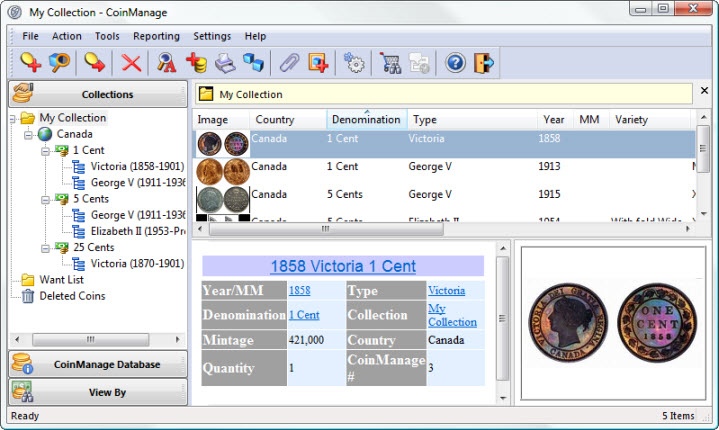
CoinManage Canada 2013 Numismatic Software is a comprehensive inventory program for the Canadian coin collector. Save many hours of data entry by simply picking from the provided listings of more than 2100 coin varieites from Canadia and the Canadian Provinces. A View window allows you easily view your collection in many different ways. View Want List and Sell List info. View your coins by Month of Purchase, Month of Sale, Set, Location, Dealer, Customer, Grading Service, Year, Grade and Mint Mark. Want to see and perhaps print all coins in your collection dated 1961? Simply open the Year icon and click on 1961. Use the CoinManage Needed to Complete feature to see which varieties are needed to complete a particular type set. Now includes an integrated Report Designer and support for printing and scanning bar codes. CoinManage includes an integrated eBay coin search that will instantly find auctions for the coins you desire. Bullion coin values can be updated instantly using the latest Gold, Silver and Platinum spot prices.
About CoinManage Canada Coin Software
This Cataloging program is available in English. It was last updated on 29 September, 2026. CoinManage Canada Coin Software is compatible with the following operating systems: Windows.
The company that develops CoinManage Canada Coin Software is Liberty Street Software. The latest version released by its developer is 2013.
The download we have available for CoinManage Canada Coin Software has a file size of 58.7 MB. Just click the green Download button above to start the downloading process. The program is listed on our website since 2013-06-06 and was downloaded 0 times. We have already checked if the download link is safe, however for your own protection we recommend that you scan the downloaded software with your antivirus. Your antivirus may detect the CoinManage Canada Coin Software as malware if the download link is broken.
How to install CoinManage Canada Coin Software on your Windows device:
- Click on the Download button on our website. This will start the download from the website of the developer.
- Once the CoinManage Canada Coin Software is downloaded click on it to start the setup process (assuming you are on a desktop computer).
- When the installation is finished you should be able to see and run the program.
Program Details
System requirements
Download information
Pricing
Version History
version 2013
posted on 2013-06-06
Improved Reporting, Updated Values for 2008, Improvements to the Report Designer.
Disclaimer
External Download
We do not host CoinManage Canada Coin Software on our servers. We did not scan it for viruses, adware, spyware or other type of malware. This app is hosted by the software publisher and passed their terms and conditions to be listed there. We recommend caution when installing it.
The external download link for CoinManage Canada Coin Software is provided to you by apps112.com without any warranties, representations or guarantees of any kind, so access it at your own risk.
If you have questions regarding this particular app contact the publisher directly. For questions about the functionalities of apps112.com contact us.
